# Sending reports to VigiLyze
Once shared, the report will be accessible for analysis in VigiLyze alongside reports from other member organisations in the WHO Programme for International Drug Monitoring.
VigiLyze is updated twice a week, on Sundays and Wednesdays. Keep these schedules in mind when sharing reports and checking for them in VigiLyze.
### Share individual reports
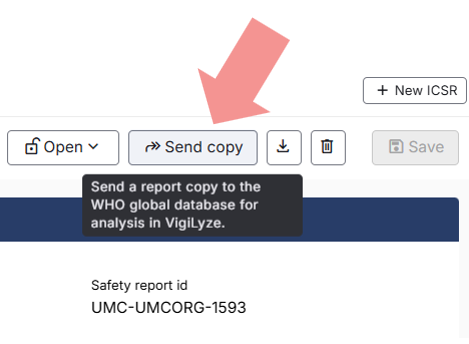
When inside a report, you can share it using the **`Send copy`** button.
### Share multiple reports
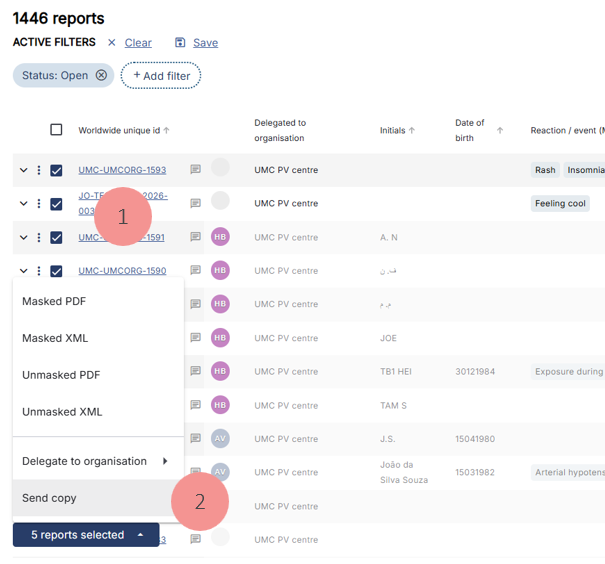
Multiple reports can also be shared in one go, from the "**Report list**".
1. Select the reports to be sent to VigiLyze by clicking the box to the left of the Worldwide Unique ID.
2. Go to **reports selected** menu and choose **`Send copy`**.
The next section describes how to [send batches of reports to VigiLyze](https://support.who-umc.org/vigiflow/manage-reports/sending-batches-of-reports-to-vigilyze).
### VigiLyze status in Report list
The column VigiLyze in the “Report list” should be interpreted as this
* **Empty**: The report has not been shared with VigiLyze
* **Check mark** (✔): The report has been shared with VigiLyze
* **Exclamation mark** ( **!** ) : The latest version of the report hasn’t been shared.
{% hint style="info" %}
Explore training courses through our [Learning Management System](https://learning.who-umc.org/). Log in if you have a learner account or create a learner account by clicking **Enrol**.
Refer to the VigiFlow Introductory Course: “**Receiving and sharing reports**” section → “**Receive and share ICSRs**”
**Note**: VigiFlow online courses are only available to VigiFlow users. Check with your national regulatory authority for access.
{% endhint %}